Cybersecurity November 21, 2026 5 min read

Telehealth Security: HIPAA Compliance for Virtual Care

Secure your practice virtual visits by implementing strict patient identity verification and encrypted communication channels. Learn how to maintain HIPAA standards during every remote consultation to protect sensitive health data.

DC

David Chen

Cybersecurity Director

Telehealth Security: HIPAA Compliance for Virtual Care

Ensuring HIPAA Compliance During Virtual Consultations

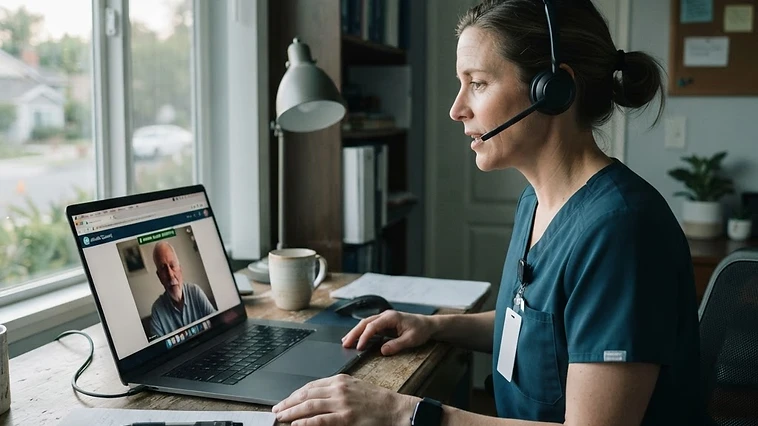
Telehealth security HIPAA compliance requires that all video consultations occur over encrypted connections that prevent unauthorized access or interception of protected health information. Practices must use dedicated platforms that provide a business associate agreement, which legally binds the vendor to handle patient data according to federal privacy and security rules. You must avoid standard consumer video tools that lack the encryption and audit logs necessary for a medical environment. Using professional healthcare cybersecurity measures ensures that every remote encounter remains as secure as an in person visit.

Your clinical staff must verify the identity of the patient before the session begins to prevent unauthorized access to a medical record. This process involves checking a digital image of a government issued ID against the profile in your electronic health record. Do not rely on video call displays or usernames to verify a patient identity. Establishing these protocols early reduces the risk of accidental exposure during digital check ins and protects your it compliance status from common breaches found in remote setups.

  • Sign a business associate agreement with all video vendors
  • Verify patient identity with government issued identification
  • Ensure video traffic uses end to end encryption standards
  • Disable recording features by default in platform settings

Managing Digital Waiting Rooms and Access Control

The digital waiting room serves as a gatekeeper for your virtual practice, preventing external parties from joining a sensitive medical discussion. Your front desk staff should manage this area by admitting only the specific patient scheduled for that time slot. Leaving a waiting room open without a moderator creates an opportunity for unauthorized individuals to enter a session or listen to private health information. These digital barriers are essential for maintaining the confidentiality of your practice operations.

Implement a waiting room policy that requires active admission for each participant by the doctor or medical assistant. This ensures the clinician remains in control of who participates in the consultation. If a user is waiting in the lobby for more than ten minutes, staff must confirm their identity before letting them into the meeting room. Using managed it services can help your practice configure these settings to ensure they remain consistent across every computer in the office.

  • Require manual admission for all virtual meeting participants
  • Use unique meeting IDs for every single telehealth appointment
  • Restrict screen sharing permissions to authorized clinical staff only
  • Lock the digital room once the scheduled patient has joined

Recording Policies and Clinical Documentation

Recording telehealth sessions introduces significant legal and security risks for a medical practice. You must store these files in a secure manner if your state laws or insurance requirements mandate keeping them. Most practices should disable the recording feature entirely within their video platform to minimize the storage of sensitive media. If a record is required for clinical purposes, store the file within the electronic health record rather than keeping it on a local computer or a consumer grade cloud storage service.

If you must record a session for diagnostic review, ensure the file is encrypted both at rest and in transit. Assign specific staff members to manage these files, and conduct regular audits to ensure no recordings exist on personal devices or insecure desktops. Consult with healthcare it consulting professionals to establish a standard retention policy that aligns with federal guidelines and your internal privacy requirements, ensuring you do not keep media longer than absolutely necessary.

  • Disable automatic recording features in platform settings
  • Require written consent if a session must be recorded
  • Delete all local copies of video files after uploading
  • Perform quarterly audits to purge old telehealth media

Securing the Endpoint Devices Used for Telehealth

The computer or tablet used by the provider is a critical point of failure in telehealth workflows. You must secure these devices with up to date antivirus software, full disk encryption, and active screen lock timeouts that trigger when the doctor is not actively using the machine. If a staff member uses a laptop in an exam room, they must ensure the camera is pointed away from other sensitive information during the video call to prevent accidental exposure of other patient charts.

Staff should also use private, wired, or secured wireless connections when conducting video visits. Avoid public Wi-Fi networks in coffee shops or open offices, as these create vulnerabilities for data interception. Our team can assist with network security management to ensure your practice remains protected from external threats. Always ensure that the hardware used for video conferencing is under your direct control and not used by staff for personal browsing or social media.

  • Enable mandatory automatic screen locks on all workstations
  • Install and monitor active endpoint protection software
  • Use hardware privacy shutters on all telehealth webcams
  • Restrict the use of public networks for patient consultations

What to do next

Follow these steps to audit and improve your telehealth security. Start by reviewing your current video platform contract to confirm you have a valid business associate agreement on file. Then, audit your office settings to ensure waiting rooms require manual admission and recording functions are turned off. Finally, train your front desk and clinical team on proper identity verification procedures for every remote encounter.

If you identify gaps in your current setup, reach out for a professional cybersecurity audit to verify your defenses. Protecting your patient records requires constant vigilance and updated workflows. Reviewing your hardware and network configurations today prevents costly data breaches and maintains the trust of your patients tomorrow. A systematic approach to security protects your clinical reputation and your bottom line while providing high quality care to those who need it most.

  • Verify that your video software vendor provides a BAA
  • Audit waiting room configurations for every clinician
  • Draft a clear internal policy for identity verification
  • Schedule a security assessment to identify current gaps

Key Takeaways

  • 1Sign a business associate agreement with every telehealth vendor to satisfy federal privacy requirements.
  • 2Verify every patient identity using a government issued ID before allowing them into a video session.
  • 3Disable recording features and enforce screen locks on all clinical devices to prevent accidental data exposure.
telehealth security HIPAAHIPAA compliant video conferencingremote patient care securityprotecting patient health recordscybersecurity for medical practices
DC

David Chen

Cybersecurity Director

David is part of the Titan Healthcare IT team, helping medical, dental, and clinic practices across Los Angeles keep their technology secure, compliant, and dependable. Connect with us on our contact page.

FREQUENTLY ASKED

Cybersecurity FAQ

No, you should not use standard consumer video applications. These apps often lack the specific encryption, audit logs, and signed business associate agreements required by HIPAA. Using platforms that are not designed for clinical use increases your risk of a data breach and potential regulatory penalties.

Related Articles

All articles

FREE IT RISK ASSESSMENT

Find Your IT Risks Before They Find You

Get a free, no-obligation IT risk assessment for your healthcare practice, we’ll identify HIPAA, security, and downtime risks and respond within 1 business hour. Only your name, email & phone are required.

Services Interested In *

No obligation · Your details are never shared